

Depreciate your assets
Depreciation records how an asset loses value over its life. You define the rules once as a profile, attach that profile to an asset along with its acquisition cost, and Belrald Assets accrues the loss month by month — writing each accrual to the Ledger so it never has to be re-entered. The result is a running book value and accumulated depreciation you can read on any asset.
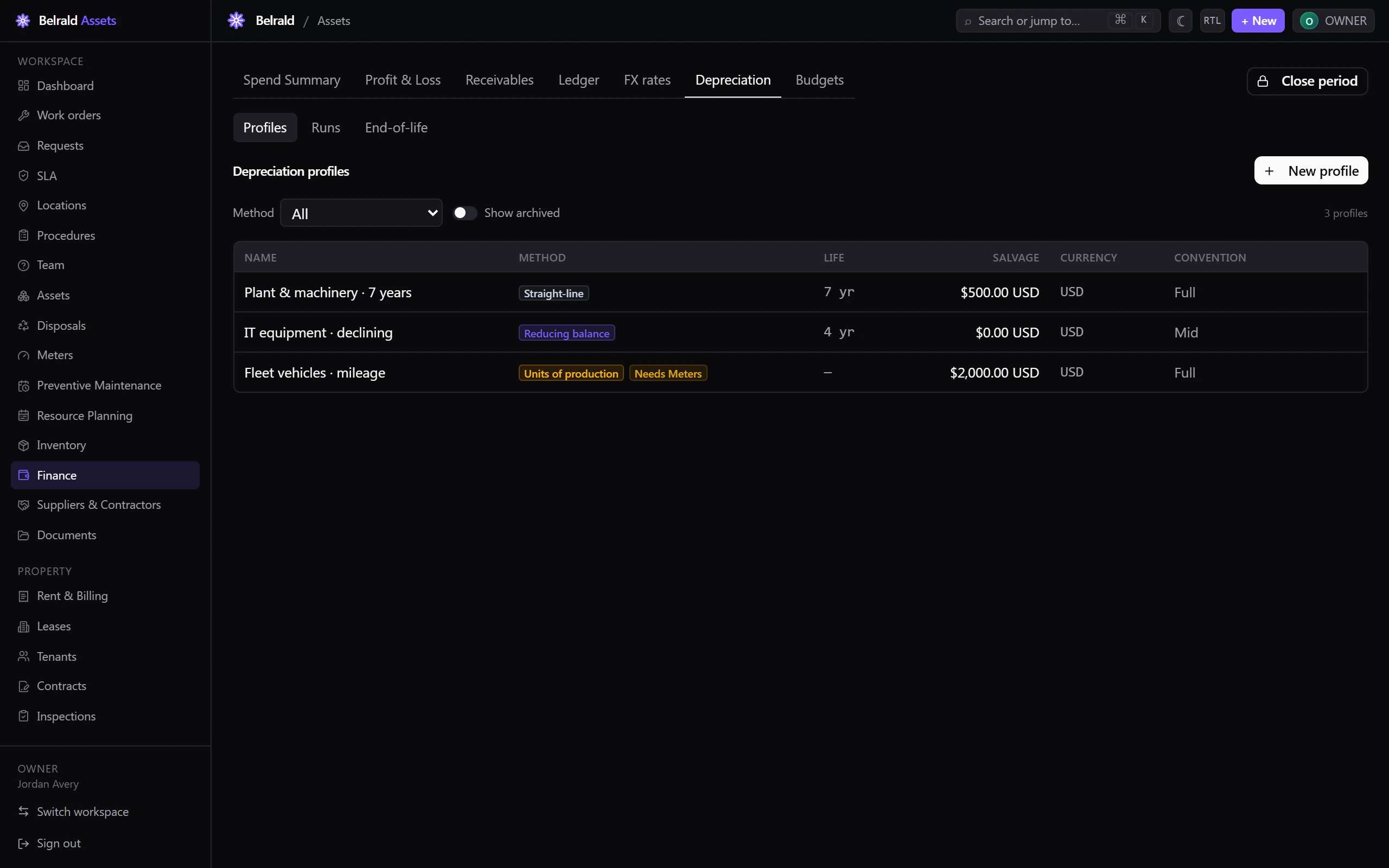
Depreciation lives under Finance → Depreciation, which has three tabs: Profiles, Runs and End-of-life.
The depreciation methods
Section titled “The depreciation methods”A profile uses one of three methods:
- Straight-line spreads the cost evenly across the asset’s life. It needs a Useful life (years).
- Reducing balance takes a fixed percentage of the remaining book value each period, so more is written off early. It needs a useful life; you can also set a Declining rate %. Left blank, it defaults to double-declining (200 ÷ life).
- Units of production depreciates by usage rather than time, and needs a Total expected units.
Every profile also carries a Currency, a Salvage value (the floor the book value won’t drop below), and a First-period convention — Full month, Mid month or Half year — which decides how the first period is prorated.
Create a depreciation profile
Section titled “Create a depreciation profile”- Go to Finance → Depreciation → Profiles.
- Select New profile.
- Enter a Name, for example
Plant & machinery · 7 years. - Choose the Method. The fields below change to match it.
- Fill in the method’s inputs — useful life, declining rate, or total units.
- Choose the Currency and enter a Salvage value.
- Pick a First-period convention.
- Select Save profile.
Assign a profile to an asset
Section titled “Assign a profile to an asset”Depreciation only starts once a profile and an acquisition cost are attached to the asset.
- Open the asset and select its Depreciation tab.
- Select Assign profile.
- Choose a Profile.
- Enter the Acquisition cost and Acquisition date. The cost must be in the profile’s currency, and the salvage value must be less than it.
- To post history back to the acquisition month, tick Recompute history from acquisition date. Left off, depreciation starts from the current period.
- Select Assign profile.
To stop an asset accruing, select Detach. Existing entries and their ledger history are kept, so you can reassign a profile later.
Read an asset’s book value
Section titled “Read an asset’s book value”The asset’s Depreciation tab shows the current position: Book value, Accumulated depreciation, Acquisition cost and Salvage, alongside the method and useful life. A Book value over time chart plots the schedule down to the salvage floor, with maintenance spend overlaid. Badges flag an asset that is Fully depreciated or Near end of life.
Run depreciation
Section titled “Run depreciation”Belrald Assets runs depreciation automatically on the 1st of each month. The Runs tab lists every run with its Period, Status, Trigger, assets Considered, entries Posted, assets Skipped and the Total accrued per currency.
Owners and admins can also run one by hand:
- On the Runs tab, select Recompute.
- Choose a Scope — A period, One asset, or Backfill history.
- Enter the Period (
YYYY-MM), and an asset or backfill start if the scope needs one. - Select Recompute.
Runs are queued and processed in the background, so a new run appears in the list a moment later. Periods that already have entries are skipped unless those entries have been reversed.
Open a run to see its totals broken down per currency and a link to the matching depreciation entries in the ledger.
Find assets near end of life
Section titled “Find assets near end of life”The End-of-life tab lists assets approaching the end of their useful life or their salvage value. Filter by Book value below a figure or by Age ratio, and each row shows the Reason — Book value low or Age exceeds life. Select Flag for disposal to raise a disposal for that asset with its details prefilled.
Archive a profile
Section titled “Archive a profile”To retire a profile, archive it from the Profiles tab. Archived profiles can’t be assigned to new assets, but existing entries are kept and assets already using it keep accruing.
Was this page helpful?
Thanks — your feedback helps us improve these guides.