

Keep a risk register
The risk register is your system of record for the things that could go wrong —
information-security threats, safety hazards, continuity and environmental
exposures — and what you are doing about each one. Every risk carries a
reference like RSK-0001, a live inherent score, a treatment, and a review
date, so the register reads as an ISO 31000 / ISO 27001 assessment auditors
expect.
Find it under Governance → Risk Register. The desk has two tabs: Register — the list — and Matrix, a 5×5 heatmap of the same risks.
Raise a risk
Section titled “Raise a risk”- Go to Register and select Add risk.
- Enter a Title that names the risk in plain language.
- Pick the Subject — what the risk is about:
- Asset or Location — choose the specific asset or location.
- Process or Organisation — type a free-text subject label.
- Describe the Threat (what could happen) and the Vulnerability (why it could happen).
- Choose the Category — Information security, Safety, Continuity, Environmental, Reputational or Financial.
- Tag any Standards the risk maps to — ISO 27001, ISO 45001, ISO 22301 or Other.
- Set the inherent Likelihood (1–5) and Impact (1–5). The Inherent score is filled in for you as likelihood × impact.
- Set a Review frequency — Monthly, Quarterly, Semi-annual or Annual — and a Review date.
- Save the risk.
The subject type is fixed once the risk exists — editing a risk changes its core fields (title, threat, vulnerability, category, standards, scores and review), but not what it is about.
Browse and filter the register
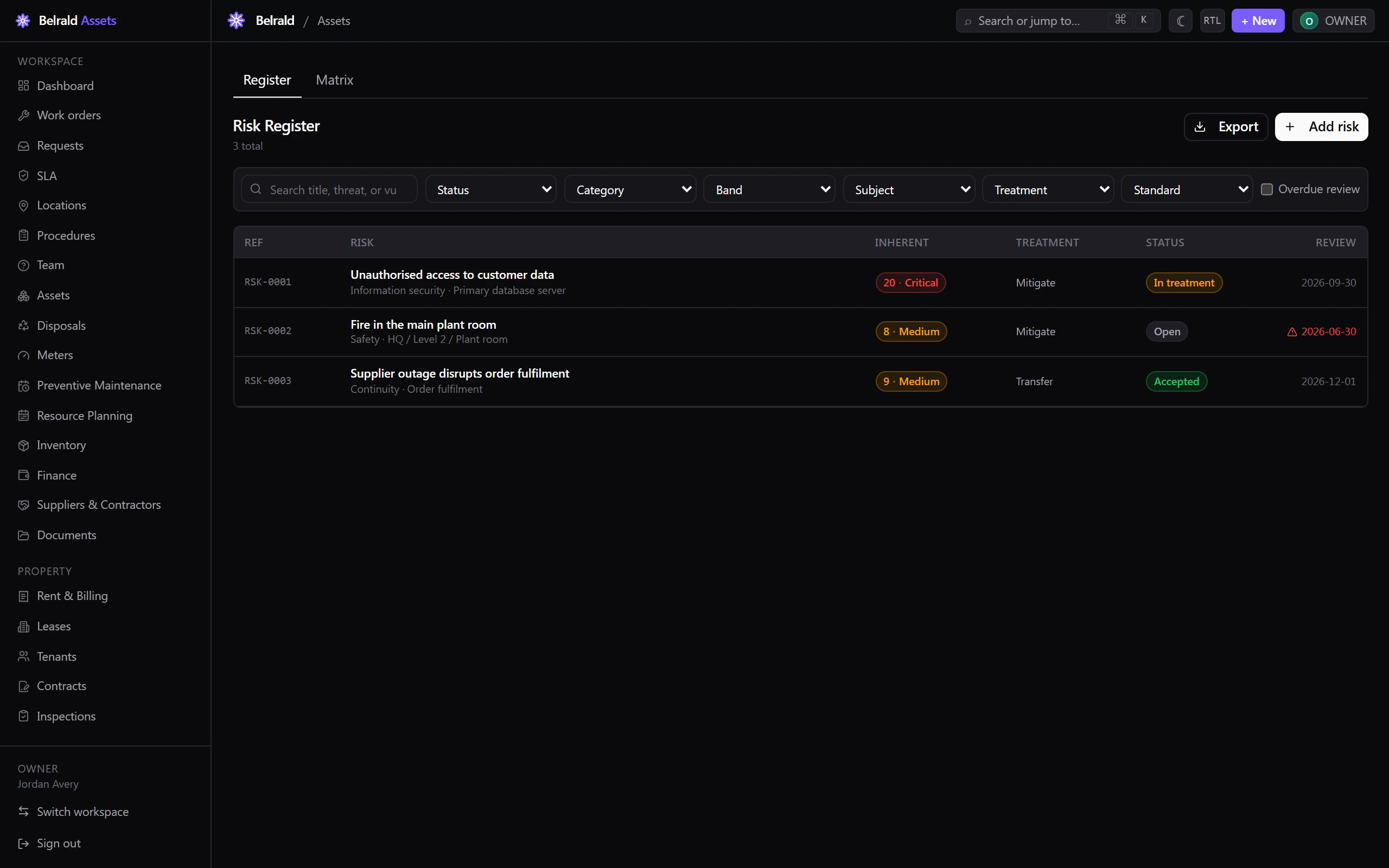
Section titled “Browse and filter the register”The register lists each risk with its reference, title, category and subject, its inherent score and band, its treatment, its status and its next review date. A risk whose review date has passed is flagged in the review column.
Filter the list by Standard, Category, Subject, Treatment, Status and Band, turn on Overdue review to see only risks due for review, or search across the title, threat and vulnerability.
Set a treatment
Section titled “Set a treatment”Open a risk and select Set treatment to record how you are handling it.
Choose the Treatment:
- Accept — live with the risk at its current level.
- Mitigate — reduce it with controls.
- Transfer — shift it, for example through insurance or a contract.
- Avoid — stop the activity that creates it.
Mitigate and Transfer both require a Treatment plan and a Due date — you cannot save them without both. Accept and Avoid need neither.
Accept the residual risk
Section titled “Accept the residual risk”Accept captures the risk you are left with after treatment. Select Accept, then:
- Set the Residual likelihood (1–5) and Residual impact (1–5). The Residual score is shown against the inherent score.
- Write an Acceptance justification — why the residual risk is acceptable. This is the ISO 27001 6.1.3 sign-off and is required.
- Confirm with Accept risk.
Review on a cadence
Section titled “Review on a cadence”Each risk carries a review frequency and a next review date. When that date passes, the risk shows as overdue in the register and can be found with the Overdue review filter, so nothing quietly drifts out of date. Editing a risk is where you set the next review date.
Close a risk
Section titled “Close a risk”Move a risk to Closed when it is resolved or no longer relevant, and give a Reason — closing always requires one. A closed risk stays in the register as a historical record; its edit, treatment and accept actions are no longer offered.
Delete soft-deletes a risk instead: it leaves the register but is kept for audit, and only owners and admins can do it.
Read the risk matrix
Section titled “Read the risk matrix”The Matrix tab plots every scored risk on a 5×5 grid — likelihood down, impact across — with each cell coloured by its band and showing how many risks land on that score. Toggle between the Inherent and Residual basis; the residual view only counts risks that have an accepted residual score. Band totals for Critical, High, Medium and Low sit above the grid.
Statuses to expect
Section titled “Statuses to expect”A risk moves Open → In treatment → Accepted → Closed. The status you see reflects where the risk is in that lifecycle.
Who can do what
Section titled “Who can do what”Owners and admins have the full register. Managers can do everything except delete a risk or accept a High or Critical residual risk. Technicians and members have read-only access — enough for an assigned treatment owner to see their risks — and viewers are read-only but may Export the register for an audit submission.
Was this page helpful?
Thanks — your feedback helps us improve these guides.