

Permits at the point of work
A permit to work is the formal authorisation to do a hazardous job: what the hazards are, what has been isolated, who is competent to authorise it, and when the work may happen. One permit covers one work order.
Raise the permit
Section titled “Raise the permit”Raise it from the work order where you can — the permit kind, required PPE, procedure and assets are copied from the job, and you only fill in the rest.
To create one from scratch:
- In the sidebar, select Permit to Work, then New permit.
- Choose the Work order. Each work order can have one permit.
- Set the Permit kind, the Location and the Assets involved.
- Set the Requestor — internal, or a contractor. A contractor requestor needs their Contractor vendor selected.
- Set Valid from and Valid to. The window should cover the work, not the whole shift.
- Under Hazards & controls, add each hazard with its control and the residual severity once the control is in place.
- Under Isolation points, add every point that must be isolated, with the isolation method.
- Check the Required PPE list, then select Save draft.
Isolate, then submit
Section titled “Isolate, then submit”- Apply the isolation at each point — lock and tag as your site requires.
- On the permit, select Isolate against each point as you do it. The permit records who isolated it and when.
- Select Submit for authorisation.
Get it authorised
Section titled “Get it authorised”The authoriser is a different person from the requestor — you cannot authorise your own permit. Before authorising, the platform checks that:
- the authoriser holds every required certification, valid and unexpired;
- every isolation point is isolated;
- a contractor requestor has a current safety induction for this site and this kind of work;
- no other live permit shares an isolation point over an overlapping time window.
If a conflicting permit exists, the authorisation screen links straight to it so the clash can be resolved rather than guessed at.
Run the work
Section titled “Run the work”- Once authorised and inside the validity window, select Activate. The permit becomes Active and work may begin.
- If work has to stop — weather, a change of conditions, a shift end — select Suspend with a reason, and Resume when it’s safe to continue.
An active permit that runs past its Valid to time is suspended automatically, so an expired permit never quietly stays open.
Close it out
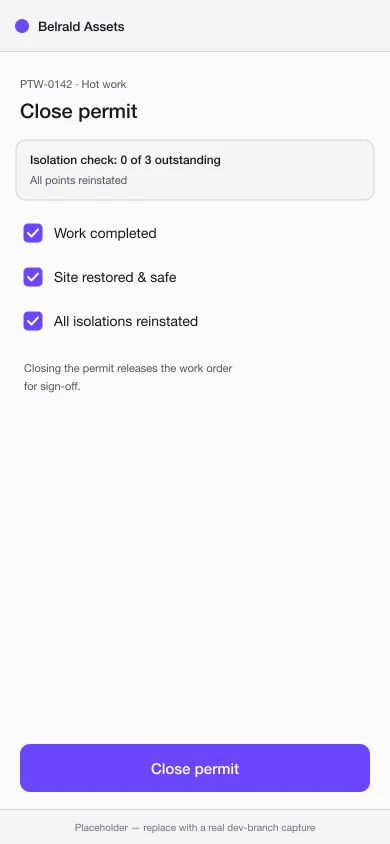
Section titled “Close it out”- Reinstate every isolation point and select Reinstate against each one.
- Select Close permit.
- Confirm all three: Work completed, Site restored & safe, and All isolations reinstated.
A permit can be cancelled while it is still a draft, pending authorisation or authorised — that is, before work starts. Once it’s active, the way out is to close it.
Was this page helpful?
Thanks — your feedback helps us improve these guides.