

Plan a budget
A budget is an annual spend plan you enter month by month. Belrald Assets compares it against actual ledger spend, projects where the year will land at the current run rate, and warns you before you run out.
Create a budget
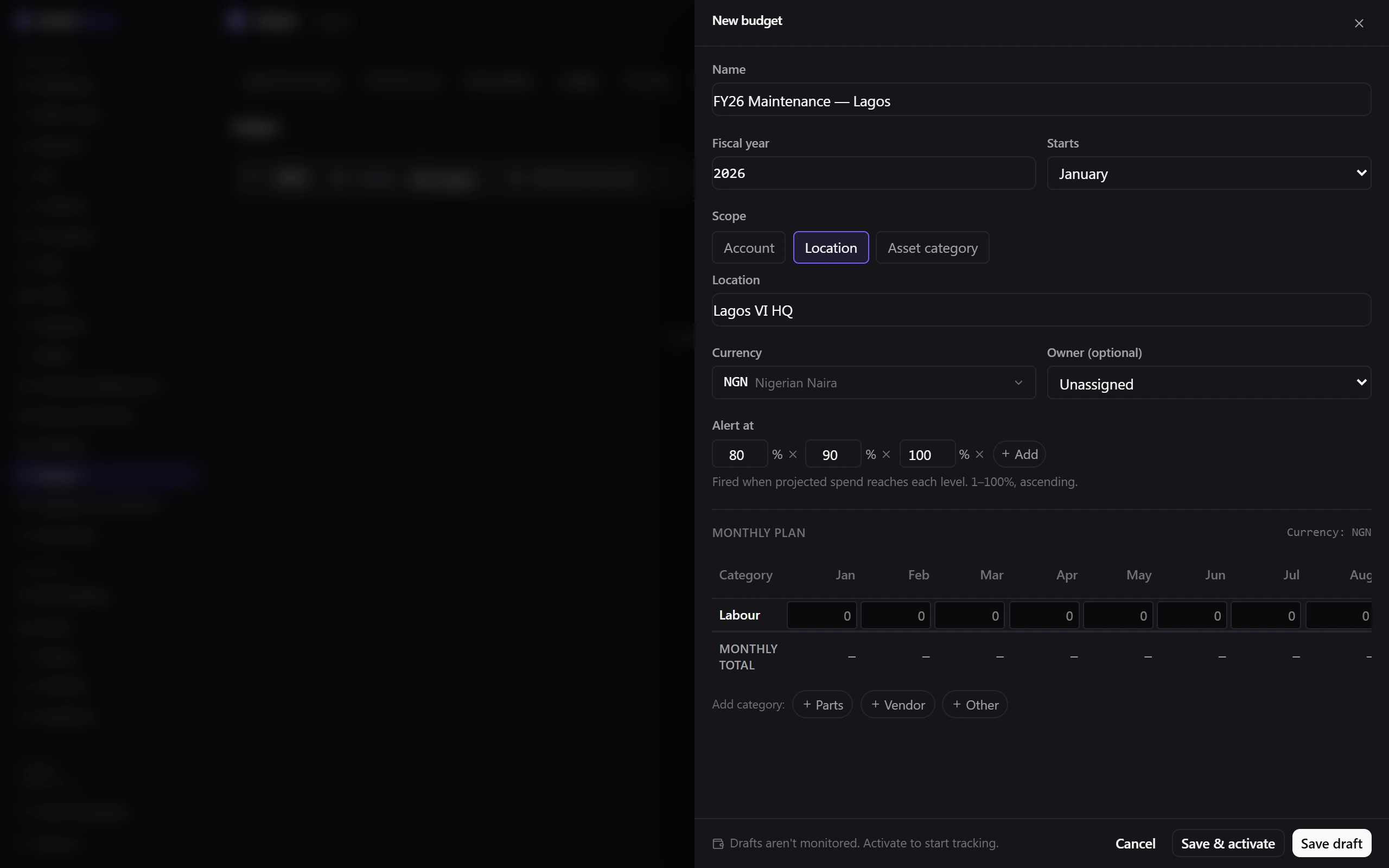
Section titled “Create a budget”- Go to Finance → Budgets and select New budget.
- Enter the Name.
- Choose the Fiscal year and the month it Starts.
- Choose the Scope — the whole account, a Location, or an Asset category — and pick the target.
- Choose the Currency and the Owner who is accountable for it.
- Set the Alert at thresholds. Up to four, from 1% to 100%, in ascending order.
- Build the Monthly plan: for each of the four fixed categories — Labour, Parts, Vendor and Other — enter twelve monthly amounts. Running Row total, Monthly total and Grand total figures update as you type.
- Select Save draft, or Save & activate if you are ready.
Activate it
Section titled “Activate it”Only Active budgets are monitored. A draft tracks nothing, and an archived budget stops being monitored. Activate as soon as the numbers are agreed.
You can only have one budget per fiscal year for a given scope and target. Belrald Assets refuses an overlapping budget and points you at the existing one.
Read the variance
Section titled “Read the variance”Open the budget’s Variance view and set the As of date. It shows Budgeted, Actual (to date), Variance and Projected annual, broken down By category, By month, or as a matrix.
Alerts and over-budget approvals
Section titled “Alerts and over-budget approvals”Each threshold fires once per period and category, measured against the projected annual run rate rather than spend to date — so you hear about a problem while there is still time to act.
Crossing your committed-spend limit raises an approval request. Select View in Approvals to see who it is with.
Retire a budget
Section titled “Retire a budget”Archive a budget at year end — it stops being monitored but keeps its history. Deleting is restricted to owners.
Was this page helpful?
Thanks — your feedback helps us improve these guides.