

Create and activate a lease
A lease is the record of one tenancy: which unit, which tenant, for how long, at what rent. It drives rent invoicing, the unit’s occupancy, and the move-in and move-out inspections, so it is worth getting the detail right before you activate it.
Draft the lease
Section titled “Draft the lease”-
In the sidebar, select Leases.
-
Select New lease.
-
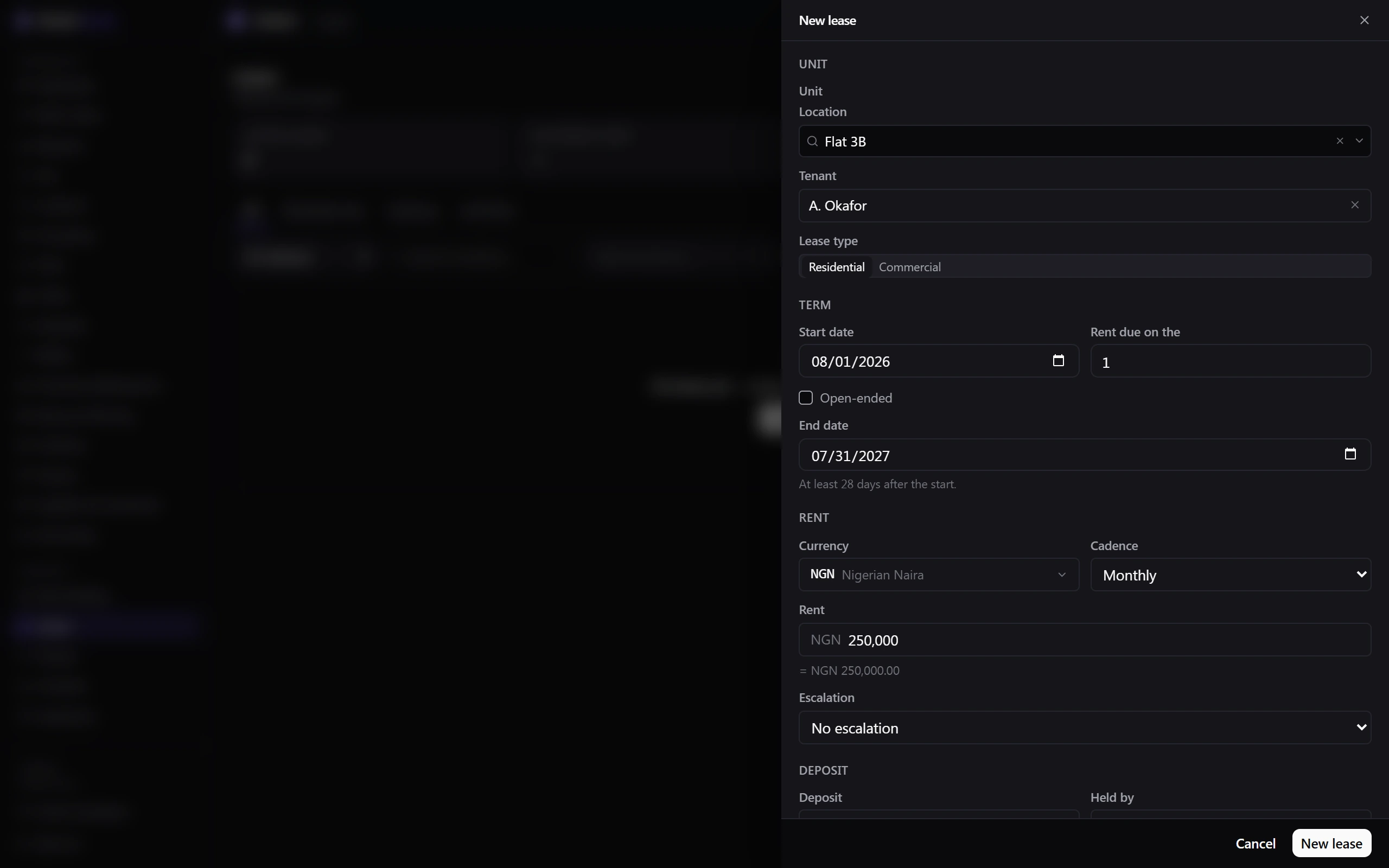
Choose the Unit. Only units that are active and marked rentable can be leased — if the unit you want isn’t listed, fix it in Locations first.
-
Choose the Tenant.
-
Set the Lease type — Residential or Commercial. This picks the status workflow the lease follows; commercial leases add a Holdover status after expiry.
-
Set the Start date and, beside it, Rent due on the day of the period, then either an End date or tick Open-ended. Choose one or the other, not both.
-
Enter the Rent and Currency, and pick a Cadence (Monthly, Quarterly or Annual).
-
Set an Escalation if rent rises on a schedule — Fixed %, RPI-linked, or Manual review. Only Fixed % exposes an Increase % and a review date; RPI-linked and Manual review don’t.
-
Enter the Deposit and choose Held by. Manager-held deposits post to your ledger when the lease activates. Escrow deposits are held externally and need an Escrow provider and a Protection reference.
-
Add any Service charges. Each row needs a Label, a Key and a Cadence (including One-off), bills either With rent or as a Separate invoice, and must use the same currency as the rent.
-
Add Additional occupants and Guarantors if the tenancy has them. Each guarantor signs their own document, separate from the lease itself.
-
Select New lease. It is created as a Draft and nothing bills yet.
Send it for signature
Section titled “Send it for signature”- Open the lease, open the Actions dropdown on the lease header, and select Send for signature.
- Bind a contract: pick an existing one, or create a new one from here. A lease can’t go out for signature without one — the parties and their email addresses live on the contract, not on the lease.
- Select Send. The lease moves to Pending signature and every signing party gets an email with their own link. They don’t need a Belrald Assets account to sign.
The lease activates on its own once the contract is fully signed — you don’t need to come back and do it.
What happens next
Section titled “What happens next”Activating the lease sets several things in motion at once:
- The unit’s occupancy changes to Occupied.
- A rent schedule is created, and invoices generate on the cadence you set.
- A manager-held deposit posts to the ledger as a receipt.
- A move-in inspection is scheduled against the lease.
From there the lease moves through Draft → Pending signature → Active → Notice given → Expired, Terminated or Renewed as the tenancy runs its course. Every change is recorded on the lease’s Timeline tab.
Was this page helpful?
Thanks — your feedback helps us improve these guides.