

Work offline and sync
Plant rooms, basements and remote sites are exactly where signal disappears and work still has to be recorded. On a phone or tablet, Belrald Assets keeps a copy of your work on the device so you carry on, and everything you did syncs when you’re back in coverage.
What “offline” means today
Section titled “What “offline” means today”The Belrald Assets web app needs a connection to make changes. If your browser drops offline, the app tells you with a banner — “You’re offline — data may be stale. We’ll refresh when you reconnect.” — and keeps showing the data it already loaded, read-only, until the connection is back. It doesn’t queue edits.
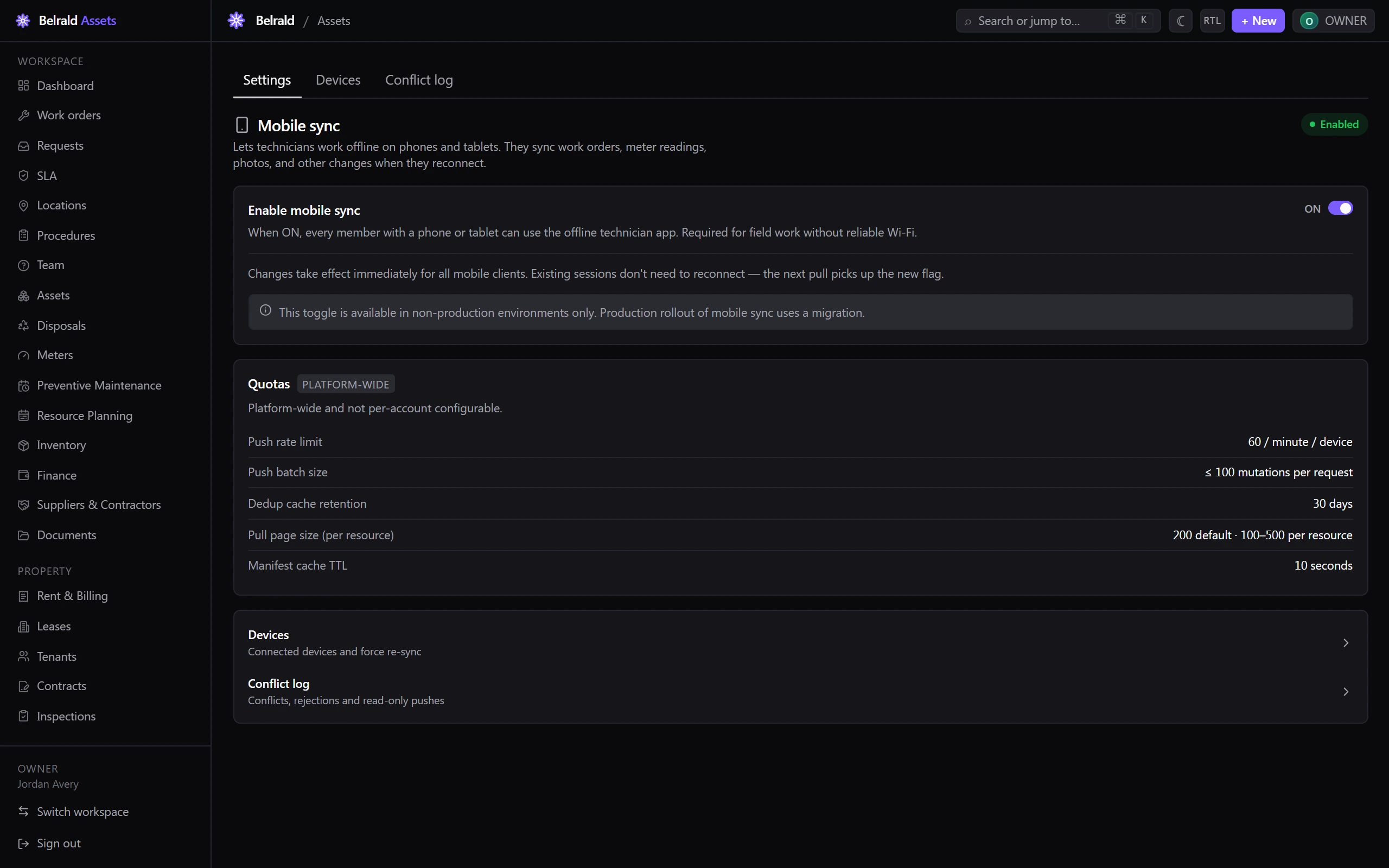
Working offline for real — capturing changes with no signal and syncing them when you reconnect — is the mobile app, which this guide describes. An owner or admin turns it on in Settings → Mobile sync; once it’s on, every phone and tablet on the account can use it.
Before you lose signal
Section titled “Before you lose signal”Open the app while you still have a connection and let it finish downloading. It keeps a local copy of the work you need on site: your work orders, the assets they cover, the procedures attached to them, and your meters.
What you can do with no signal
Section titled “What you can do with no signal”- View your assigned work orders and the assets they’re against.
- Update a work order — status, notes, time spent.
- Run a procedure and answer its steps.
- Record meter readings.
- Take photos and attach them to the job.
Reference data — labels, templates and workflow settings — comes down to the device read-only. You’ll see it offline, but it’s changed from the desktop, not from the field.
When you’re back in coverage
Section titled “When you’re back in coverage”The app sends your changes first, then pulls down everything that has changed on the server since your last sync. Each change carries its own id, so a sync that retries after a dropped connection never records your work twice.
How conflicts are settled
Section titled “How conflicts are settled”If someone changed the same record while you were offline, the app doesn’t silently pick a winner:
- Work orders and procedure runs merge field by field. Every field nobody else touched takes your value; a field that changed on the server while you were offline keeps the server’s value, and the clash is reported back to you rather than quietly resolved.
- Meter readings, time entries, parts used and comments are only ever added, never edited, so they can’t conflict.
- Assets are settled on the server. If the asset changed while you were offline, your edit is rejected and you’re shown the current version to redo it against. This is deliberate — asset records are shared, and quietly overwriting someone else’s change is worse than asking you to look again.
Manage mobile sync
Section titled “Manage mobile sync”Owners and admins run the fleet from Settings → Mobile sync:
- Enable mobile sync — the toggle that turns the offline app on for every phone and tablet on the account.
- Devices — every device that has synced in the last 30 days, with its last user, when it last synced, how many changes it pushed, and any issues. Force re-sync makes a device drop its local cache and re-download everything on its next sync.
- Conflict log — every sync conflict, read-only rejection and push rejection on the account, so you can see the merge rules doing their job.
Was this page helpful?
Thanks — your feedback helps us improve these guides.